Access Control Is No Longer Just "Swipe to Open" — It's Part of Enterprise Digital Transformation
In Taiwan, integrating access control with attendance tracking has become standard practice at many companies — the system can automatically generate daily and monthly reports and export them to Excel, easing the daily workload for admin and HR staff. As a result, many companies start by comparing prices when choosing an access control system, assuming the features are largely the same across vendors, since cost still has to be factored into the decision.
But the real key is that access control isn't just about managing "who can enter" — it can integrate with multiple security devices to strengthen protection of people and assets. Getting the initial solution selection and architecture planning right can effectively reduce security risks and future expansion costs, which is far more cost-effective than fixing problems after the fact.
Especially during emergencies like fires, companies need more than after-the-fact review — they need to grasp the on-site situation immediately, such as:how many people may still be in the building, which areas still have people moving in and out, and whether evacuation is complete。The recent major fire in Hong Kong, along with various factory fire incidents, have made companies more aware of the importance of "personnel safety" and "real-time awareness." Below are the 6 hidden factors that companies most often overlook when choosing an access control system, yet which significantly affect safety and management efficiency。
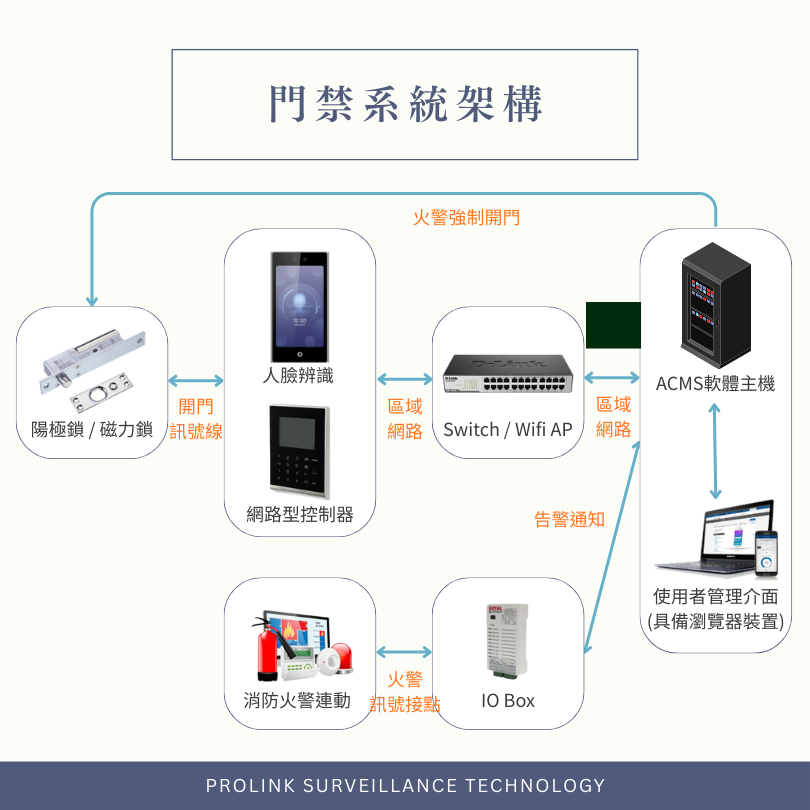
Access Control Is a System of "Front-End Devices + Door Control Core + Management Platform"
An access control system typically consists of front-end card readers and recognition devices, plus a back-end management platform.
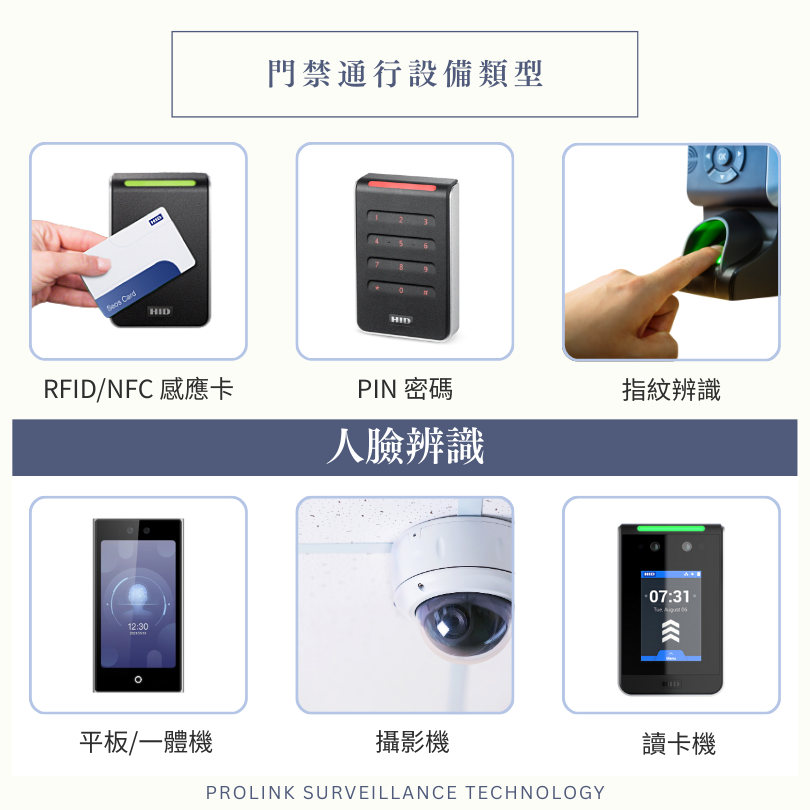
The front-end hardware handles the method of passage — card, PIN, fingerprint, or facial recognition. But what truly determines whether you can later manage permissions, audit reports, manage multiple sites, and expand with various integrations isthe management platform itself。
Factor 1: Choosing the Right Access Device
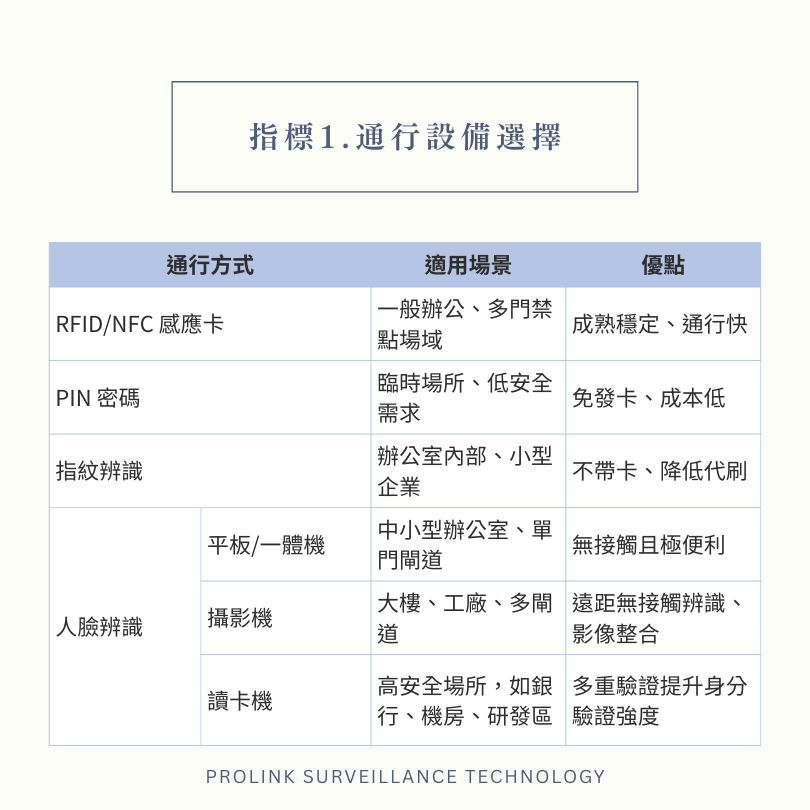
RFID/NFC Proximity Card
- Use Case:General offices, sites with multiple access points
- Pros:Mature, stable, fast passage
- Risk:Card lending or sharing; requires card management
PIN Code
- Use Case:Temporary sites, low-security needs
- Pros:No cards to issue, low cost
- Risk:PINs can leak easily; require regular updates and management
Fingerprint Recognition
- Use Case:Internal offices, small businesses
- Pros:No card needed, reduces card sharing
- Risk:Fails with wet, dry, or dirty fingers; can cause queues during peak hours
Facial Recognition (Tablet/All-in-One)
- Use Case:Small and medium offices, single-door entries
- Pros:Contactless and highly convenient
- Risk:Accuracy affected by lighting and angle
Facial Recognition (Camera)
- Use Case:Buildings, factories, multi-lane entries
- Pros:Long-range contactless recognition, video integration
- Risk:Requires high-quality deployment, considering lighting, angle, network, and system integration
Facial Recognition (Reader)
- Use Case:High-security sites such as banks, server rooms, R&D areas
- Pros:Multi-factor verification strengthens identity authentication
- Risk:Installation height must be precisely planned; recognition is sensitive to lighting
Factor 2: Multi-Factor Authentication
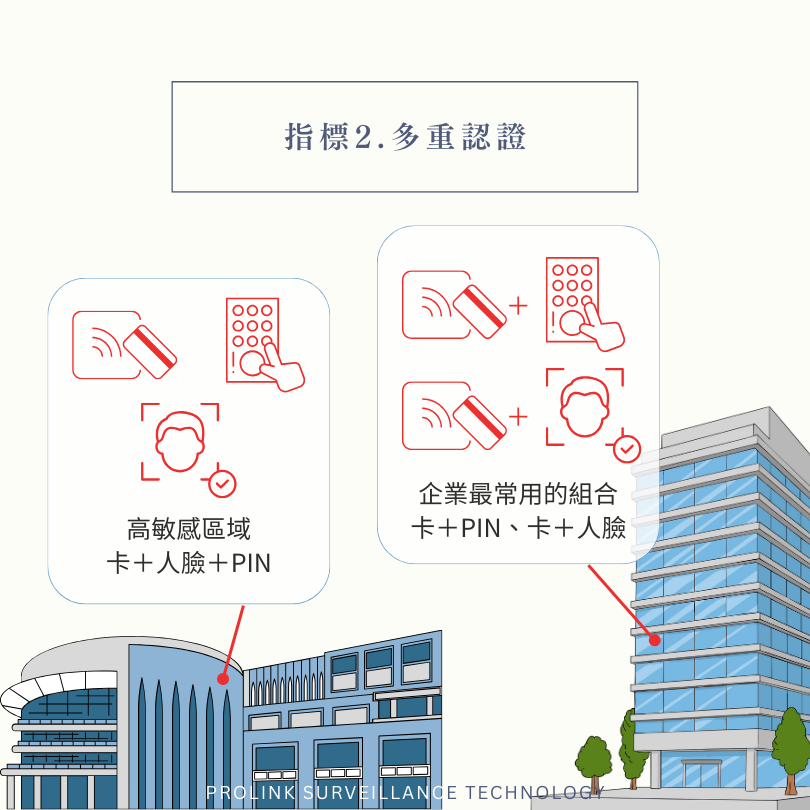
Multi-factor authentication (MFA), simply put, meansadding a "double lock" or even a "triple lock" to access control, combining different types of verification. Relying on a card or PIN alone is actually easy to fake or share; but by layering verification methods so that entry requires at least two checkpoints, you can significantly reduce the risk of unauthorized access.
The most common combinations used by businesses include card + PIN, card + facial recognition; for highly sensitive areas, you can also set up card + facial recognition + PIN to raise the bar even further. This setup is especially suited to high-risk access points such as server rooms, data centers, warehouses, and R&D areas; should any unusual attempt occur, it also leaves a more complete record for later auditing and tracing.
Factor 3: Core Security Architecture
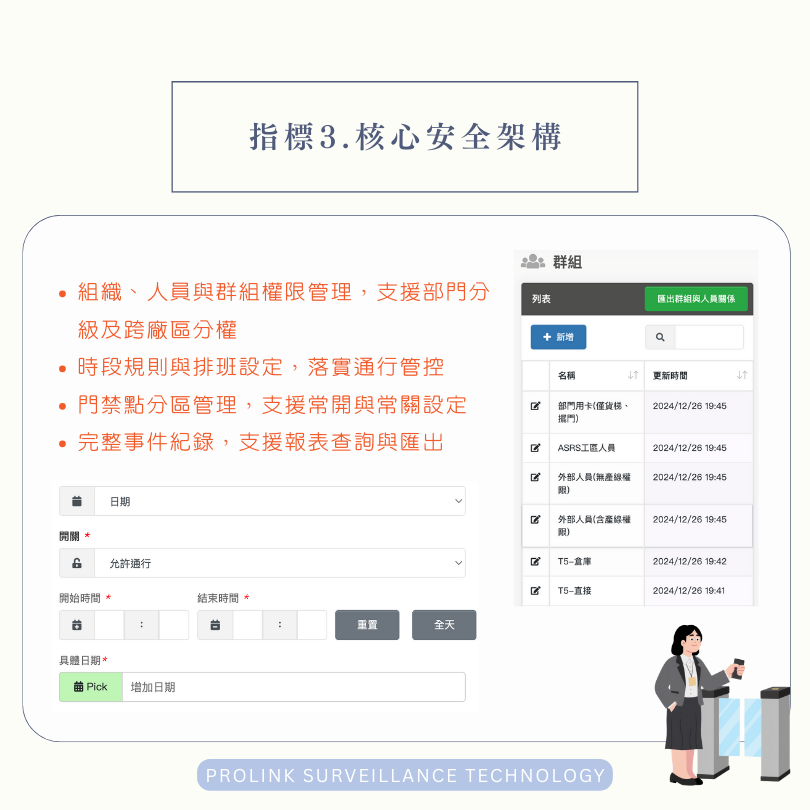
Works with your organizational structure and management policies to enforce permission control, while providing a complete basis for auditing and management after the fact.
- Organization, personnel, and group permission management, supporting departmental tiers and cross-site authorization
- Time-based rules and shift scheduling to enforce access control
- Zone management for access points, supporting normally-open and normally-closed settings
- Complete event logging, with report lookup and export support
Factor 4: Emergency and Fire System Integration
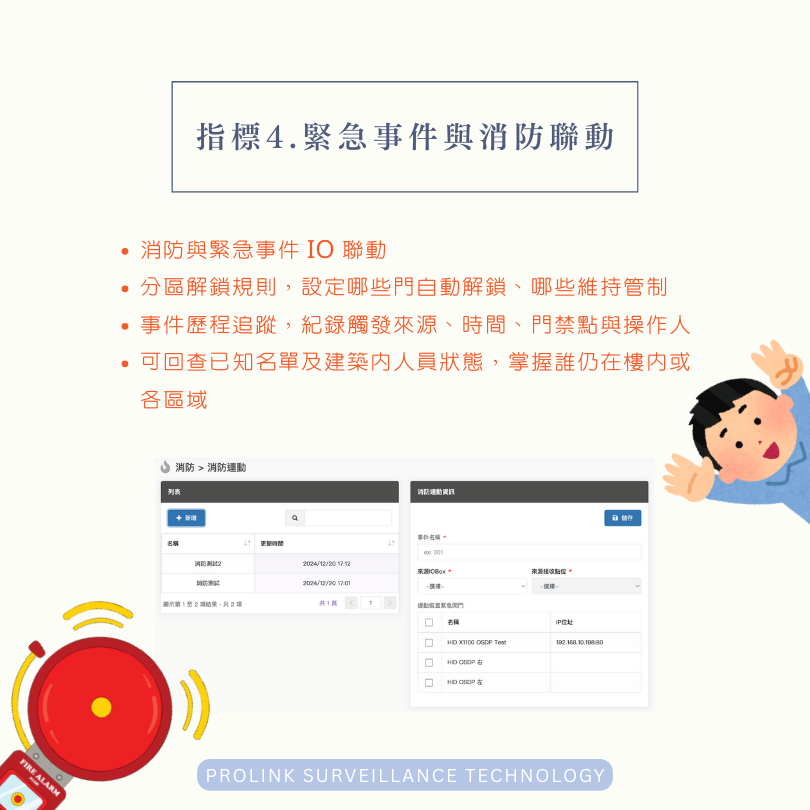
During a fire or emergency, the system can automatically unlock doors according to preset rules and quickly provide a picture of personnel status, while keeping complete records for auditing.
- Fire and Emergency I/O Integration
- Zone-based unlock rules, defining which doors unlock automatically and which remain controlled
- Event history tracking, recording the trigger source, time, access point, and operator
- Lets you look back at known personnel lists and in-building status, showing who is still in the building or in specific areas
Factor 5: Visitor Management and Remote Door Release
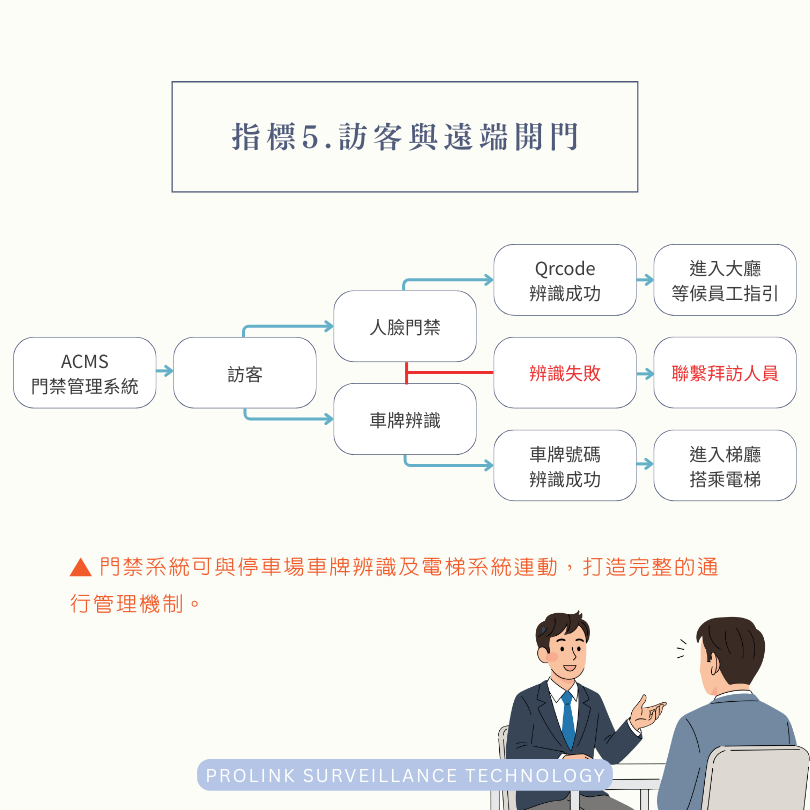
Supports temporary access needs for multi-site and hybrid work arrangements, while ensuring every door release is traceable.
- App support and remote door release
- Visitor flow management, including temporary authorization, validity periods, and single or multiple entry passes
- Visitor record tracking, logging who approved access, when they entered and exited, and which access point was used
- Consistent management across multiple access points and sites
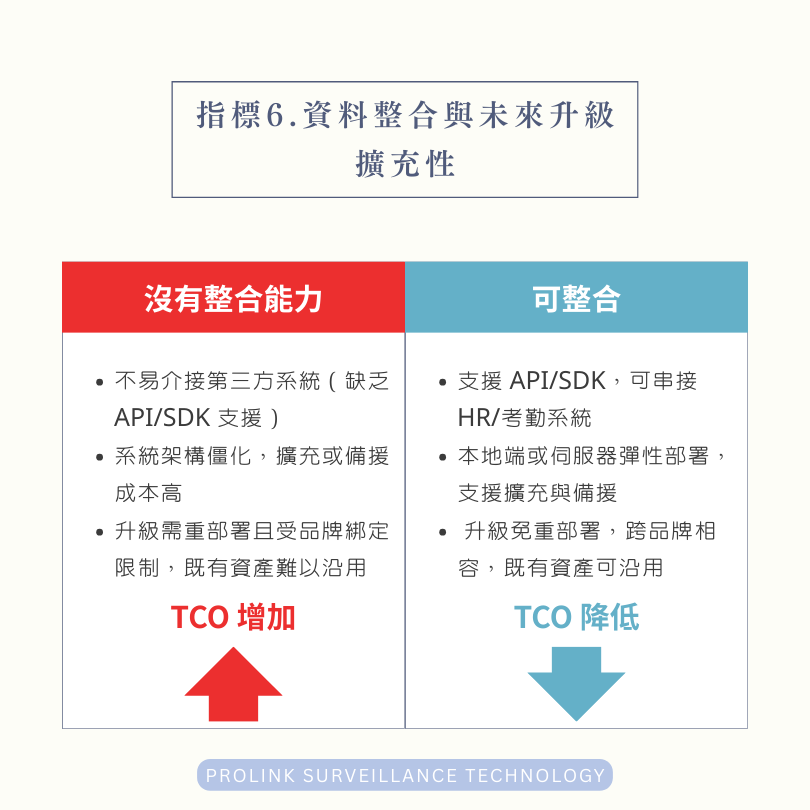
Factor 6: Data Integration and Future Scalability
Ensures integration with existing systems, so future upgrades don't require redeployment, and maximizes reuse of existing equipment assets to lower total cost of ownership (TCO).
- Supports third-party integration, including APIs/SDKs and connections to HR or attendance systems
- Flexible data storage and architecture, with the option of a local PC or server, plus support for expansion and redundancy
- Whether upgrades require redeployment, cross-brand compatibility, and whether existing assets can be reused